
Your website, customer portal and APIs are open to the whole internet. That’s the point of them, but it also means automated tools probe them around the clock, looking for a form that leaks data or a login page that will take a stolen password. If your only protection is a network firewall, most of those attacks walk straight through.
This article explains what a web application firewall (WAF) does, why it’s now a requirement for many organizations, what to look for when choosing one, and how NullWard, our self-hosted WAF and secure reverse proxy, gives most organizations everything they need on its free tier.
Why a network firewall isn’t enough
A network firewall decides which traffic is allowed in based on addresses and ports. Your website has to accept web traffic on port 443 from anyone, so the firewall lets it through. It can’t tell an ordinary page request from one that carries an attack, because to the firewall they look the same.
A web application firewall sits in front of your applications and inspects the content of every request: the URL, the headers, the form fields and the body. It recognizes the patterns attackers use and stops those requests before they reach your code.
What a WAF stops
- Injection attacks. SQL and command injection slip malicious instructions into forms and URLs to read, change or delete your data.
- Cross-site scripting. Attackers plant scripts that run in your users’ browsers to steal sessions or send them somewhere else.
- Bots and credential stuffing. Automated tools try stolen passwords at scale and hammer login pages, forms and APIs.
- Unpatched vulnerabilities. When a flaw is found in an application you rely on, a WAF in front of it buys you time while a fix isn’t ready yet.
PCI DSS 4.0 made it a requirement
If your organization accepts card payments, this isn’t optional any more. PCI DSS v4.0 requirement 6.4.2 says public-facing web applications must be protected by an automated technical solution that continually detects and prevents web-based attacks. A WAF is the most common way to meet it.
Even outside PCI DSS, customers, insurers and auditors increasingly ask how your internet-facing applications are protected. “We have a WAF in front of them” is a short, credible answer.
What to look for in a WAF
- A proven rule set. The OWASP Core Rule Set is the open standard for detecting common web attacks, and it’s maintained by the security community.
- A way to tune it. Every WAF blocks some legitimate traffic at first. You need to see what was blocked and why, and fix false positives quickly without switching protection off.
- Encryption handled for you. Certificates for every domain, issued and renewed automatically.
- Visibility. Logs of what was blocked, who signed in and what changed, for your own investigations and for auditors.
- Control over where it runs. A WAF sees every request to your applications, including sign-ins and form submissions. Running it on infrastructure you control keeps that traffic in your hands.
- A cost that doesn’t scale against you. Pricing per domain or per application quickly adds up as you grow.
Meet NullWard
NullWard is a self-hosted web application firewall and secure reverse proxy built by Sage ISG. It sits between the internet and your applications, so inspection, certificates, sign-in and logging happen in one place, on infrastructure you control, for as many domains and applications as you run.
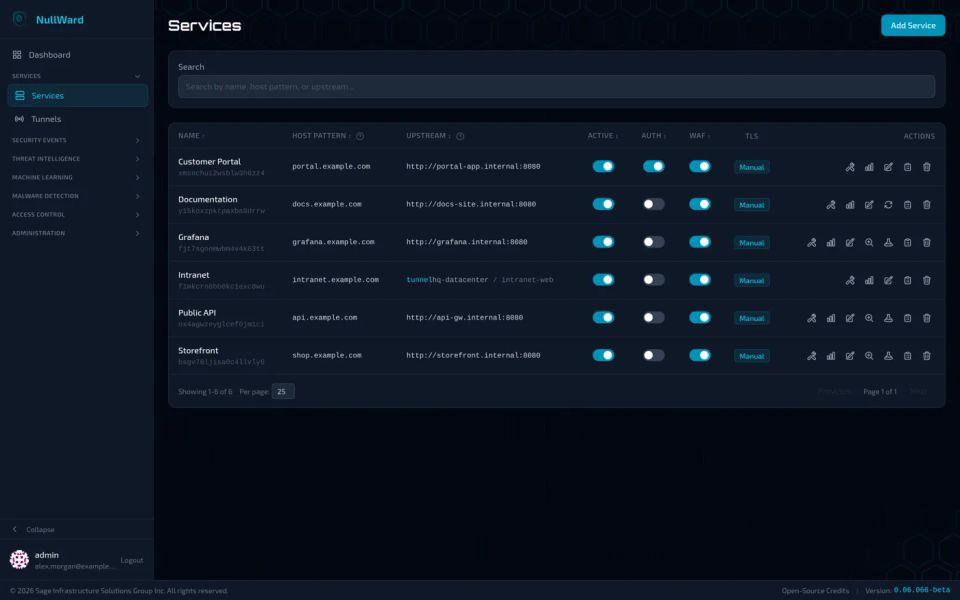
- OWASP Core Rule Set v4 blocks common attacks out of the box. Run a new service in audit-only mode first, triage events grouped by rule, and turn a false positive into a precise exclusion in one click.
- Custom rules in SecLang, globally or per service, with validation as you type.
- Sign-in for any application. Put OIDC single sign-on with Entra ID or Google, LDAP or Active Directory, or one-time email codes in front of any application, even one with no login of its own, with no code changes.
- Automatic TLS certificates for every domain.
- Threat intelligence and auto-blocking to stop known bad sources.
- Visibility and audit logging for security events, sign-ins and changes.
Free for most organizations
NullWard is free for both commercial and personal use, and the free tier isn’t a trial or a cut-down demo. It includes:
- the OWASP Core Rule Set WAF and custom rule sets
- automatic TLS certificates
- sign-in for any application
- threat intelligence and auto-blocking
- visibility and audit logging
- unlimited domains and applications
For most organizations protecting their websites, portals and APIs, that’s everything they need.
A license adds features for more demanding environments:
- a machine learning WAF
- application tunnels, which publish applications behind NAT, in a private network or in Kubernetes without opening a single inbound port
- a virtual waiting room for traffic spikes
- high availability clustering and HTTP/3 (both in beta)
- priority email support on Professional plans and above
Any license unlocks every paid feature, and you can try them all free for 30 days with no card needed.
Getting started
NullWard ships as container images and a Helm chart, so it runs wherever you already run containers. A sensible first step is to put one application behind it in audit-only mode, review what the WAF would have blocked for a few days, tune out any false positives, and then switch to blocking.
- Learn more about NullWard: how it fits in front of your applications and how application tunnels work.
- See plans and pricing, including the free tier and the 30-day trial.
Want a hand putting a WAF in front of your applications, or meeting PCI DSS requirement 6.4.2? Talk to our team.