Keyreeve
The problem
SSH keys outlive the people who made them
Most Linux fleets are still reached the way they were twenty years ago: public keys copied into authorized_keys, a few shared accounts, and passwords kept for emergencies.
- Keys nobody can account for
- Shared logins with no names
- No record of what was typed
Keyreeve replaces keys with short-lived certificates from your single sign-on, decides every login against your access rules, and records every session, on hosts and in Kubernetes.
How it works
From sign-in to a recorded session
- Step 1
Run the server
One container in your own environment, with SurrealDB and Valkey beside it and an S3-compatible bucket for recordings. Add more servers for high availability.
- Step 2
Enrol hosts and clusters
One command per Linux host. Agents dial out over mutual TLS, so hosts need no inbound port. Kubernetes clusters run a small agent inside.
- Step 3
Write access rules
Groups from your identity provider decide who reaches which hosts, as which account, with which sudo, and which Kubernetes namespaces and pods.
- Step 4
Connect
From the desktop app, the browser, or your own ssh and kubectl with a certificate that expires within hours. Every session is recorded.
The desktop app
Where your engineers will work
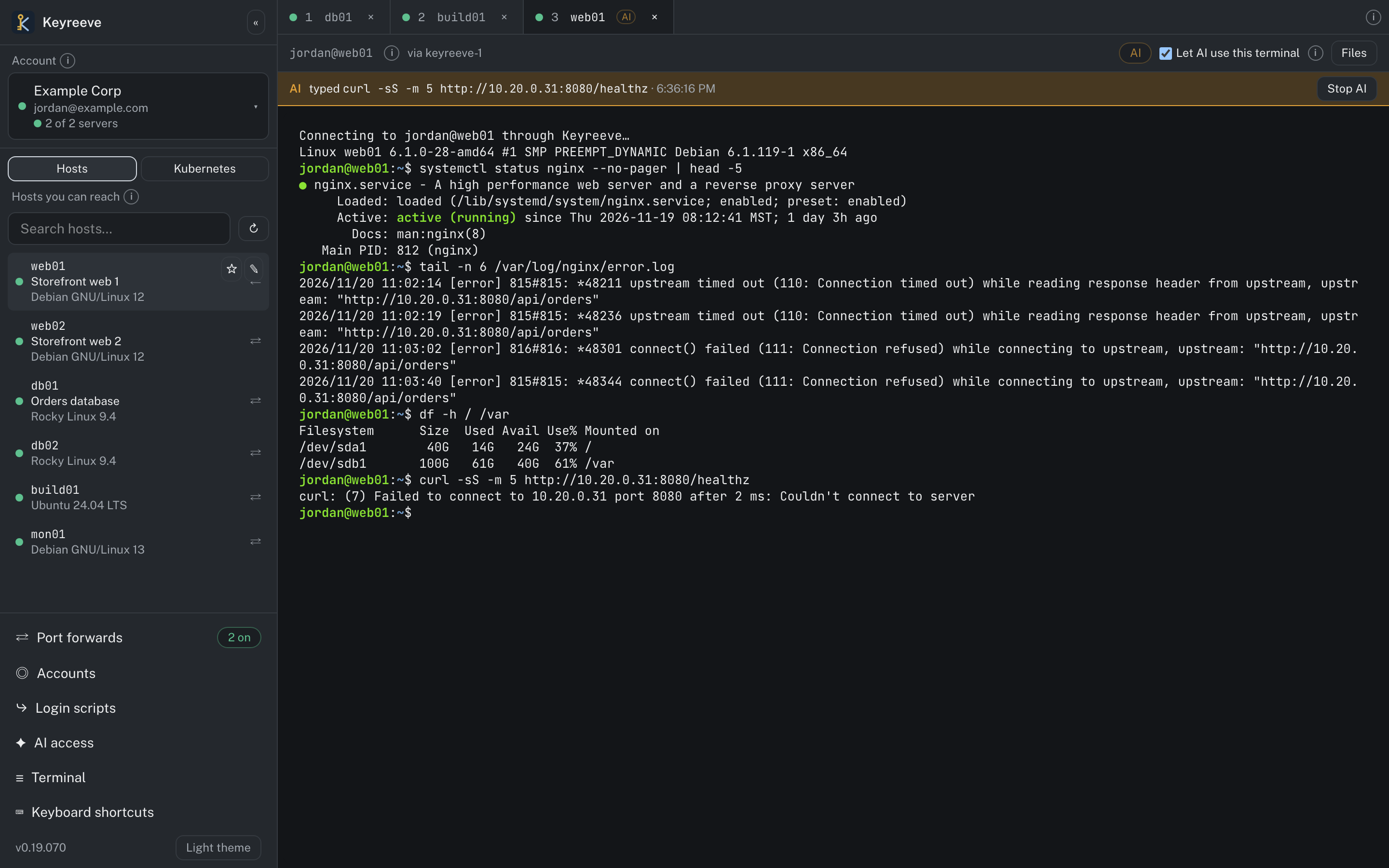
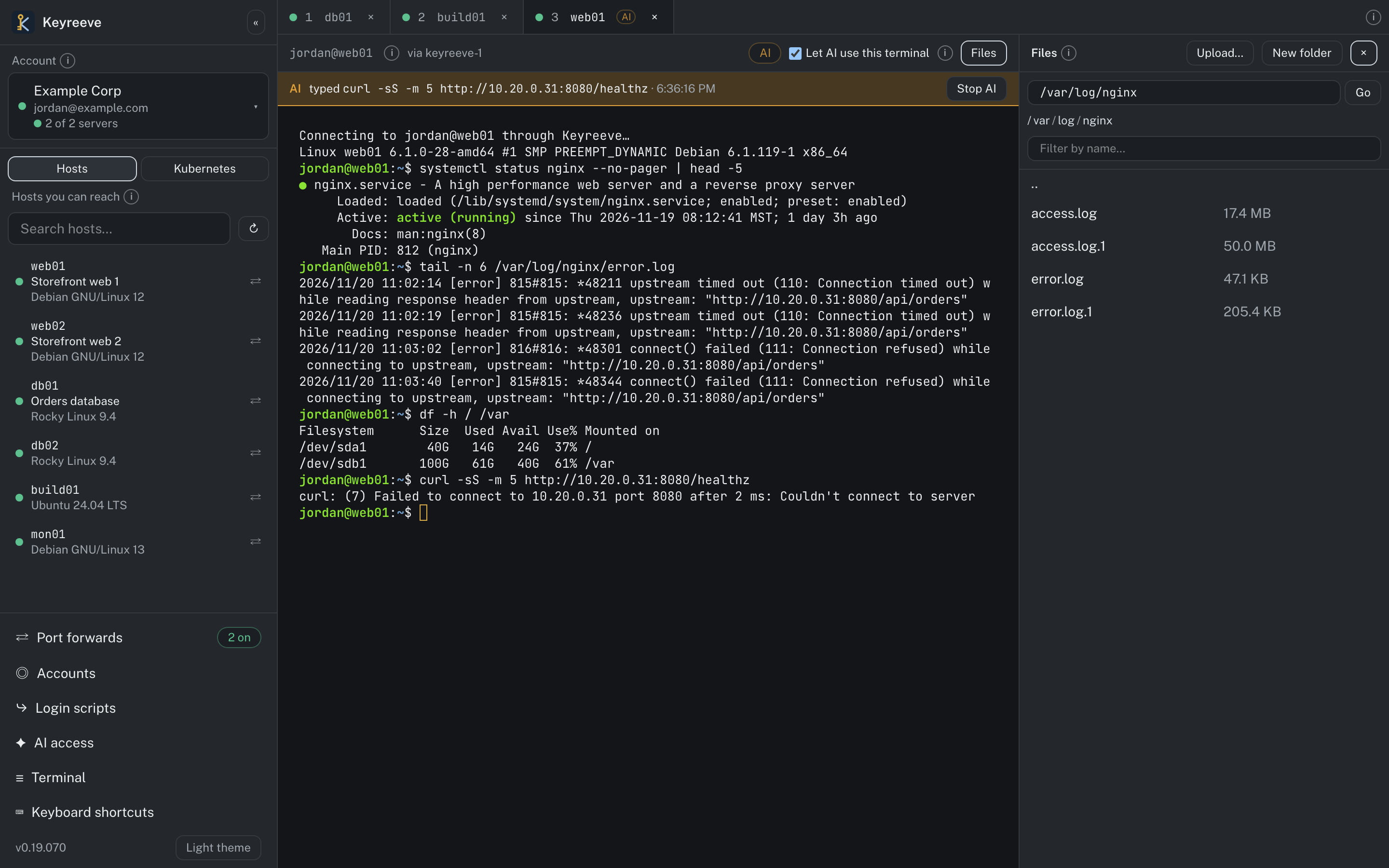
Keyreeve desktop for macOS, Windows and Linux puts every host and Kubernetes cluster a person may reach in one window, signed in with your single sign-on and recorded exactly as the server does.
- Tabs on every host you can reach, with keyboard shortcuts to move between them
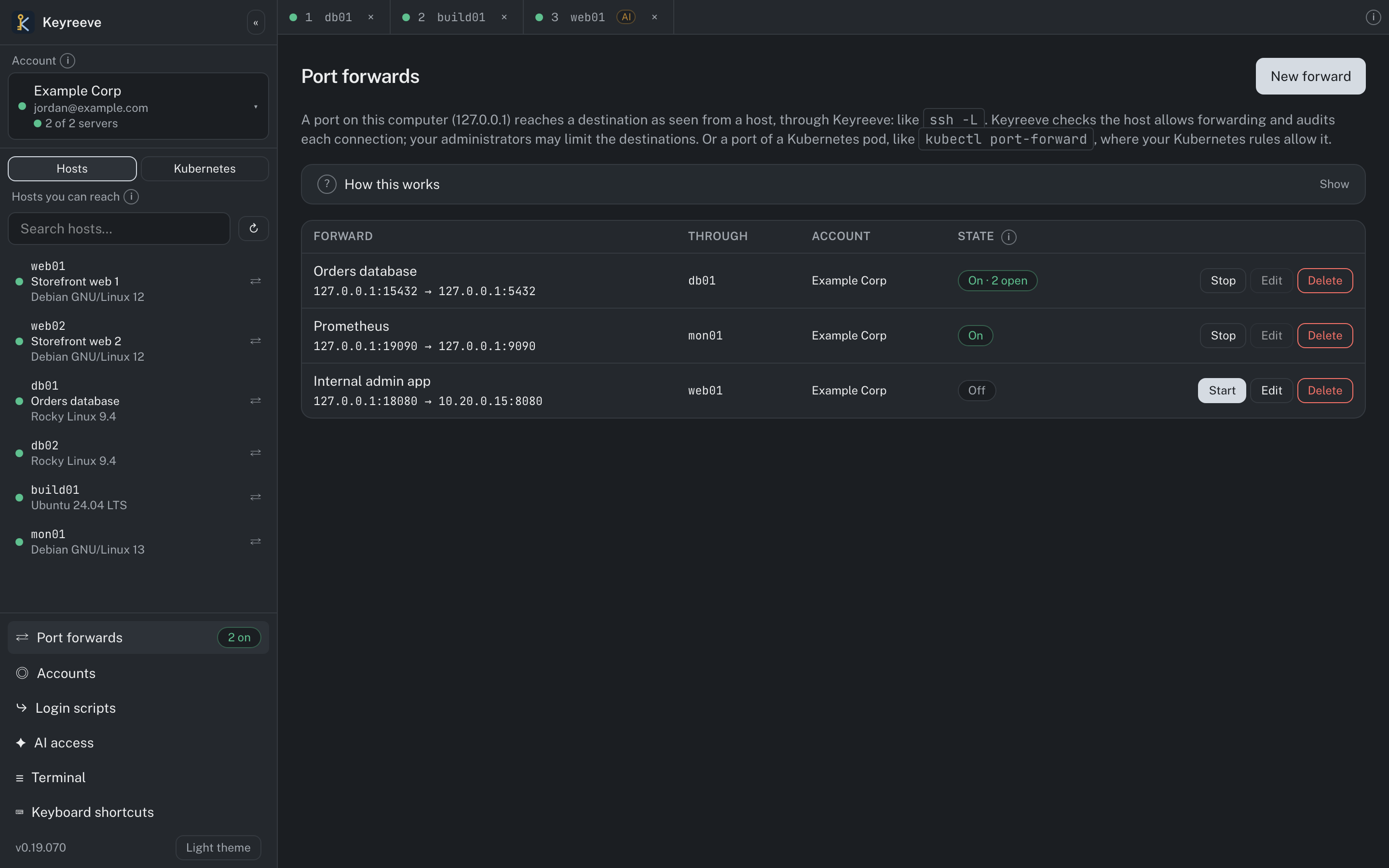
- A files panel, and port forwards to hosts and Kubernetes pods
- Everyday and privileged accounts, or several Keyreeve servers, side by side
- Your own SSH connections to other machines, in a vault behind a master password
In practice
Faster troubleshooting, without giving anything away
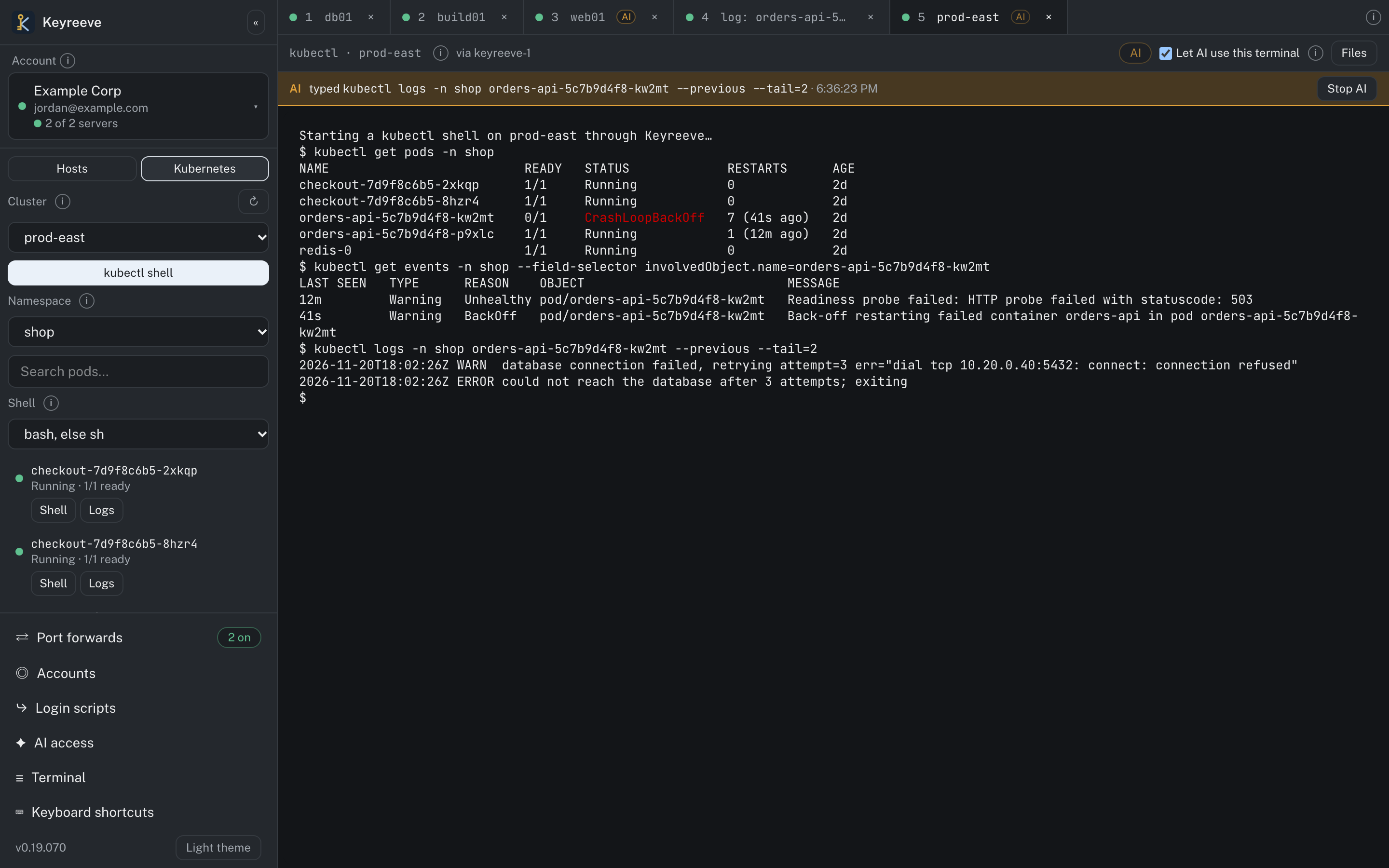
AI that does the legwork, under your control
Over MCP, an AI agent such as Claude can run the diagnostic commands in a terminal or Kubernetes shell an engineer has open, read the output and suggest a fix, while the engineer watches and keeps the final say. It's off by default and allowed per host, cluster and access rule; the engineer switches it on terminal by terminal; it has no keys of its own; and every AI keystroke is marked in the recording and the audit log. Engineers spend far less time on routine diagnostics.
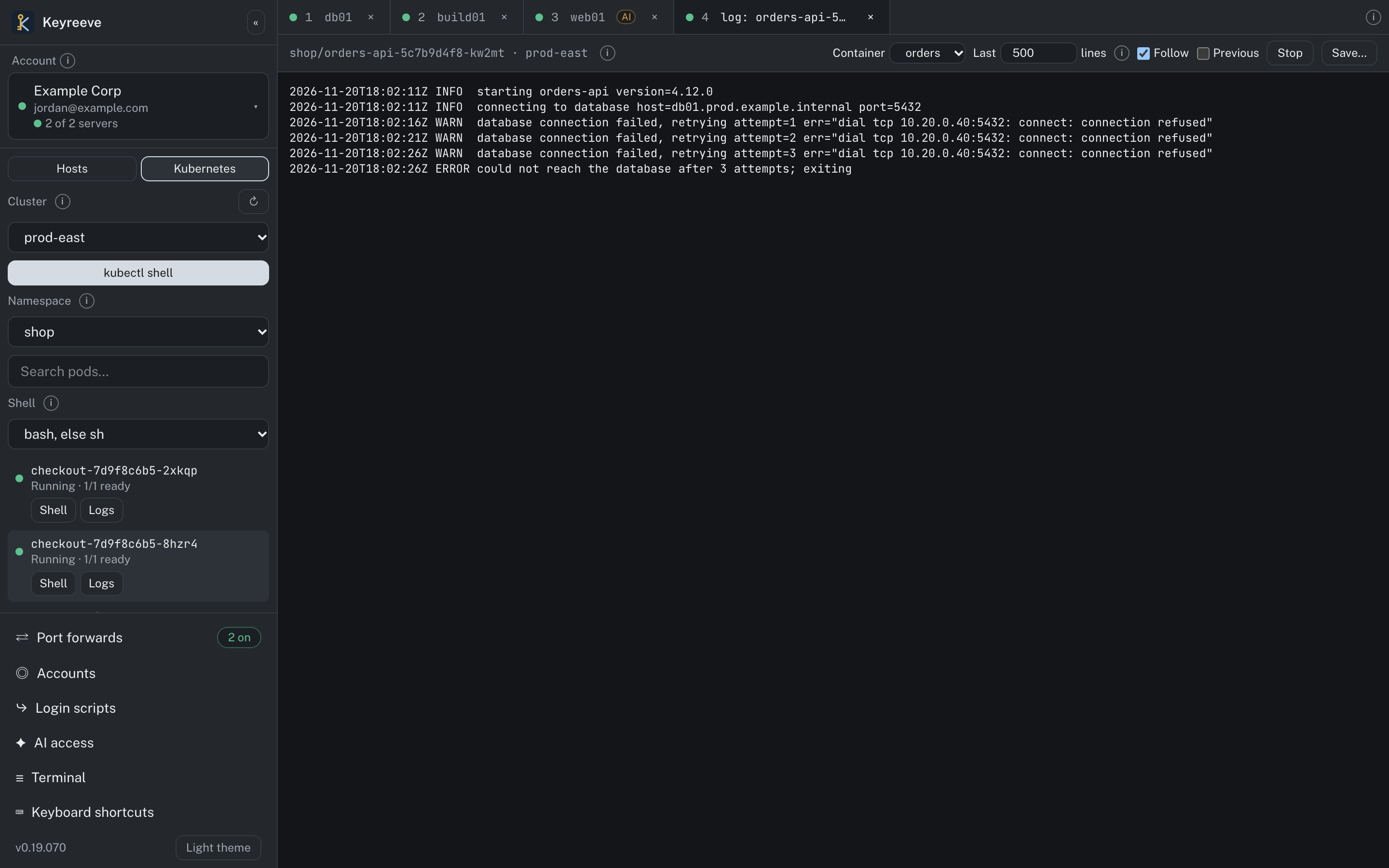
Kubernetes under the same rules
Rules grant namespaces, pods by label or a whole cluster to your groups. Keyreeve decides every API request before it reaches the cluster, acts there as the person, records exec sessions and masks secrets in every recorded change. People use kubectl through Keyreeve, or the Kubernetes view in the browser and desktop app: pod logs, recorded pod shells and a kubectl shell that leaves nothing behind.
Security
Recordings you can trust, cryptography you can attest to
Every SSH session is recorded on the host by a recorder people can't step around; a login whose processes escape it is ended. Recordings stream to the server as they happen, and administrators can watch live, search and replay with a record of who typed what.
Every Keyreeve binary runs inside the Go Cryptographic Module v1.0.0, validated under FIPS 140-3 (CMVP certificate #5247), and refuses to run outside it: the server, the agents, the CLI and the desktop app.
Your environment, your storageThe server, the agents, the certificate authorities and the recordings all stay in your environment, with recordings in your own S3-compatible bucket.
Encrypted on the host
ECDH P-384 · AES-256-GCMA recording waiting on a host is already encrypted for the Keyreeve servers, so not even root on the host can read it.
Tamper-evident
Signatures and a hash chainEach piece of a recording is signed by the host's agent and chained to the one before it, so a gap or an edit shows.
Secrets redacted
Keyed tagsPasswords typed at prompts, and patterns you define, are removed on the host before anything is stored.
Controlled viewing
Two-person approvalAn auditor role, an optional second approval before playback, and every playback in the audit log.
When things go wrong
Break-glass that works when nothing else does
Keyreeve locks SSH down to its own certificates. The one deliberate exception is the break-glass accounts you configure, so you can always reach your machines, even if your Keyreeve servers are offline or can't be reached.
Accounts you choose
Named accounts only, never root, per host or host group, each limited to the source networks you allow, with a key, a password or both.
Independent of Keyreeve
A break-glass login never contacts the Keyreeve servers. With the host's own credentials it even works with the Keyreeve agent stopped, and licensing never blocks it.
Never silent
Every break-glass login is audited, and each policy can notify the email addresses and webhook you choose, so you know whenever someone goes around Keyreeve.
Who it was
For a shared account, Keyreeve reports which key was used, so a break-glass login still has a name on it.
High availability (Enterprise)
Run several Keyreeve servers as one cluster. Every server is a full peer, and host agents and the desktop app fail over between them by themselves.
Built for your SIEM (Enterprise)
Ship the audit log and a live feed of logins, commands and programs run to your SIEM over syslog with TLS or a webhook.
Pricing
Priced per named user, with unlimited hosts
Billed yearly. Hosts and Kubernetes clusters are unlimited on every plan, and accounts that only audit are free.
- Home: up to 2 usersCA$0per year
- Standard: 10 users includedCA$1,200per year
- Enterprise: 25 users includedCA$5,400per year
Extra users are CA$120 a year on Standard and CA$216 on Enterprise, with 10% off from 100 users and 15% off from 250. Need something else? Contact us for a Custom plan.
Home is for personal, non-commercial use only.
FAQ
Questions, answered
What teams usually ask before they put Keyreeve in front of their fleet.
Does Keyreeve run in our environment?
Yes. The server is a container you run, with SurrealDB and Valkey beside it, and recordings go to your own S3-compatible bucket. Hosts run the keyreeved agent, packaged for Debian- and Red Hat-based distributions, and Kubernetes clusters run a small agent inside.
Which identity providers work?
Any OpenID Connect provider, several at once. Groups come from the token or from Microsoft Graph and are mapped onto Keyreeve roles and access rules.
Do we have to open ports on our hosts?
No. Agents dial out to Keyreeve's agent service over mutual TLS and open a tunnel when a session is wanted.
Can we still reach our hosts if Keyreeve is down?
Yes, through the break-glass accounts you configure. A break-glass login never contacts the Keyreeve servers, and every use is audited and can notify the people you choose.
Can an AI assistant use our hosts on its own?
No. It can only type into a terminal a person has open and has allowed it into, where an administrator has allowed AI for that host or cluster and the person's access rule permits it. It acts as that person, and every AI keystroke is recorded and audited.
Is FIPS mode something we switch on?
No. Every Keyreeve binary runs inside Go's FIPS 140-3 validated cryptographic module (CMVP certificate #5247) and refuses to start outside it.
What counts as a named user?
Every person with an account in Keyreeve, except accounts whose role is auditor and the built-in recovery administrator. AI access acts as the person who allowed it, so it's never counted separately.
Where is the documentation?
In the store, with Keyreeve: installation, enrolling hosts, access rules, connecting, session recording, break-glass, Kubernetes, licensing and FIPS.