
Plenty of organizations check whether their staff’s email addresses appear in password breach databases. It’s a sensible habit, but it answers a narrow question, and often a late one: was this address in a website’s database that was breached and later leaked?
Today’s attackers rarely wait for that. The credentials being used against organizations right now are increasingly stolen straight from people’s own computers by infostealer malware, then traded on dark web markets and chat channels within days. This article explains the difference between a breach lookup and the kind of monitoring FathomWatch does, and why staying current with infostealers matters.
How breach database lookups work
A breach lookup service collects databases that have been stolen from websites and leaked publicly, indexes the email addresses in them, and lets you search for your own. If a site you used was breached, you find out that your account there was exposed, and you can change that password and any others you reused.
That’s useful, but it has limits:
- It only covers what has been leaked and collected. A breach often surfaces months or years after it happened, and some never surface publicly at all.
- It describes someone else’s breach. It tells you a third-party site lost its data, not that one of your people’s devices is compromised.
- It’s a point-in-time check. Unless someone keeps checking, new exposures go unnoticed.
What breach lookups miss: infostealers
Infostealer malware takes a different route. It runs on an infected laptop or desktop and quietly copies everything saved in the browser:
- saved passwords for every site, including work accounts like Microsoft 365, VPN portals and internal systems
- session cookies, which can let an attacker reuse a signed-in session
- saved card details
The result is a log for that one device, and those logs are traded on the dark web and in chat channels, often within days. Nothing about it involves a website being breached, so there may be nothing for a breach database to index, and certainly not while the stolen sessions and passwords are still fresh and working.
Infostealer logs aren’t the only early warning, either. Your domain, brand or internal host names can turn up in posts on dark web forums and markets, and on social media and chat channels, long before anything is formally “leaked”.
What FathomWatch watches
FathomWatch is built around those earlier, broader signals rather than old breach dumps. It monitors:
- Infostealer logs, the credentials harvested from infected devices
- Dark web pages, from sites, forums and markets
- Social media and chat channels, for posts that mention a domain or keyword you monitor
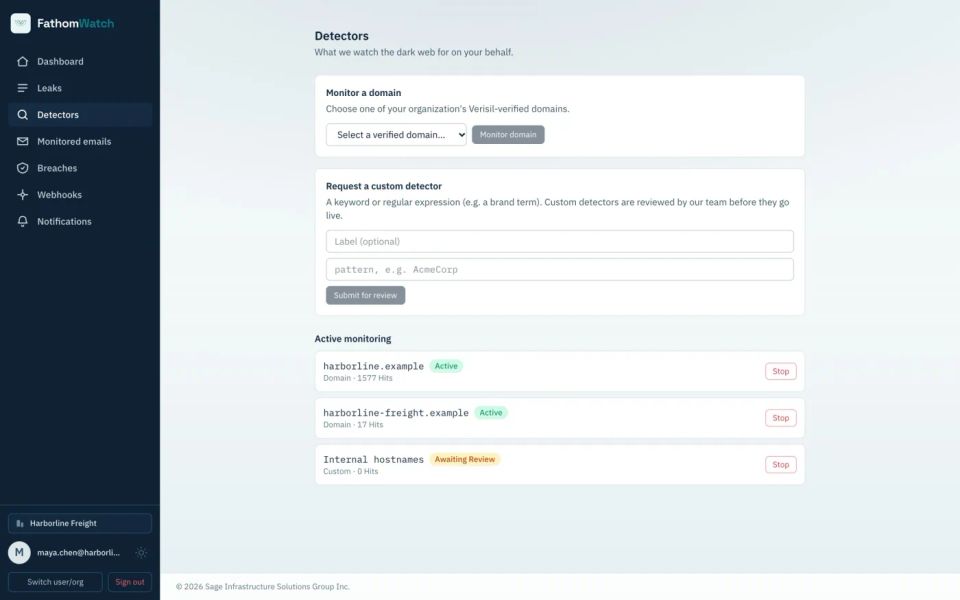
You tell it what to watch with detectors: your organization’s verified domains, plus custom keyword or regular-expression detectors, such as a brand name or an internal host name, which our team reviews before they go live.
Built to keep up with infostealers
Infostealer data is most dangerous when it’s newest, so FathomWatch is designed to be current rather than comprehensive in hindsight. Each incoming log is checked against your detectors as it arrives, often days or weeks before stolen credentials would end up in a breach database.
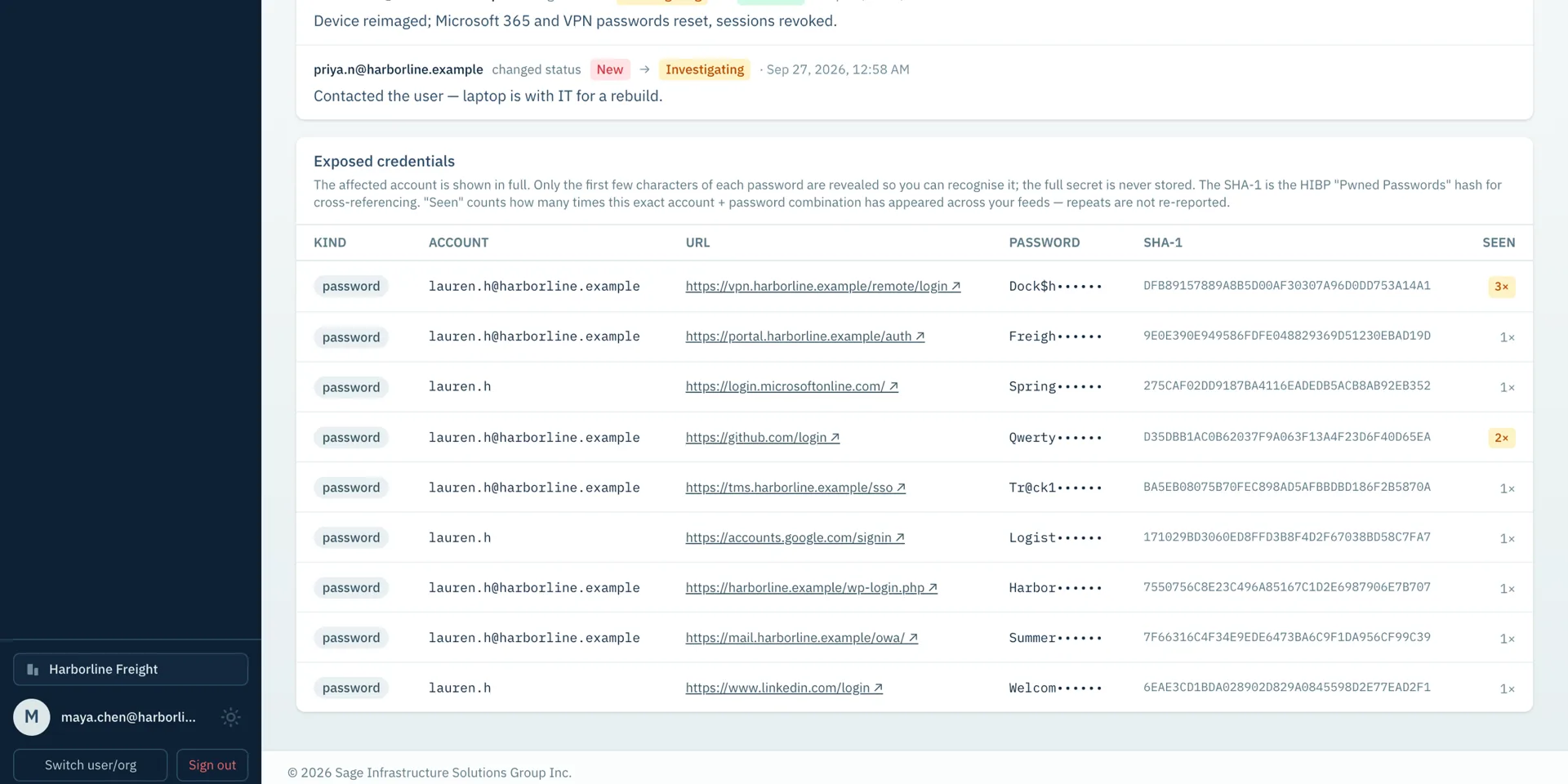
When one of your people turns up, you get an exposure that shows:
- the affected account
- the sites whose logins were stolen, so you know exactly what to reset
- a masked password, with only the first few characters shown so the owner can recognize it
A credential that resurfaces later isn’t reported twice, and FathomWatch shows how many times each one has been seen across its feeds.
It works alongside breach lookups
FathomWatch doesn’t replace a breach lookup; it covers what a breach lookup can’t. Each stolen password also comes with a SHA-1 hash, so your team can cross-reference it against public breached-password lists without ever seeing the full password.
From alert to recovery
An alert only helps if someone acts on it. FathomWatch is built for that part too:
- Team triage. Exposures move from new to investigating to resolved or dismissed, with notes and a history everyone in the organization can see.
- Help for the person affected. FathomWatch can email an affected employee a link to a step-by-step recovery guide, sent on behalf of your organization with your name and logo. It explains how to find and clean the infected device and secure their accounts in the right order, and it never contains a password.
- Your existing tools. Signed webhooks send new exposures to your SIEM, ticketing system or chat tool, and scheduled digests email your security team a CSV.
Privacy built in
A single stolen log can hold data about many people. Your organization only ever receives the lines its own detectors matched, never the rest of a log. Full passwords are never stored or shown. Admins and security analysts see the whole organization’s exposures, everyone else sees only their own, and people’s personal addresses stay private to them.
Getting started
FathomWatch for organizations starts at CA$39 a month and is priced by organization size, with no seats to assign. Individuals can monitor up to five of their own email addresses for CA$9.99 a month. Both come with a 60-day free trial, and no card is needed to start.
Found an exposure and need help responding? Talk to our team.